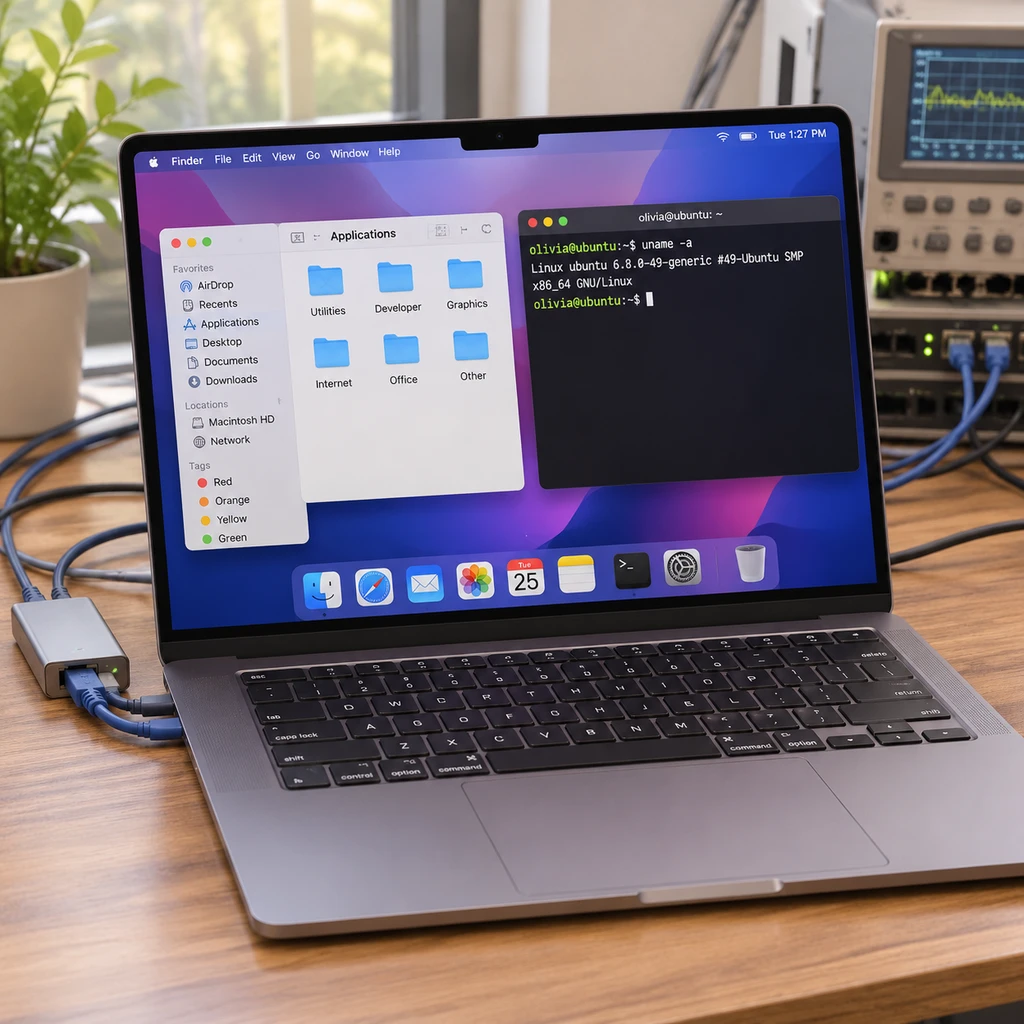
Finder 和 Dock 跑在 Linux 里,旁边的终端还能 SSH 回托管它们的 Ubuntu。GitHub 项目 xnulinux 用打过补丁的苹果公开源码构建 XNU,把它作为模块装进未修改的 arm64 Linux 内核,再用苹果安装器生成的系统盘启动 macOS 27.2.1。WindowServer、Safari 和 Chrome 都跑起来了。
这套桌面是真的,演示却仍在 Apple Silicon Mac 的 krunkit Linux 虚拟机里。项目方报告,应用压测跑了 30 分钟,没有内核 panic 或崩溃报告。它已经证明两套系统能这样共处,离证明裸机可用还有一段路。
省掉的那一层在 Linux 里面
xnu.ko 带来了 XNU 本身,应用需要的内核语义仍由 XNU 提供。XNU 跑在绑定到宿主 CPU 的 Linux 内核线程上,在 Linux 划拨的内存中自行管理页表。异常先由 Linux 接手,再转交 XNU;磁盘、网络和显示则由宿主经 fki.ko 等配套组件提供。
<svg viewBox='0 0 760 335' width='100%' height='335' role='img' aria-label='从苹果芯片 Mac 到 Linux 虚拟机、托管 XNU 和 macOS 桌面的四层结构'>
<rect x='1' y='1' width='758' height='333' rx='18' fill='#fbf9f4' stroke='#e2dccf'/>
<text x='32' y='39' font-size='20' font-weight='700' fill='#b25a3a'>虚拟化留在外层</text>
<line x1='32' y1='55' x2='728' y2='55' stroke='#e2dccf'/>
<rect x='32' y='78' width='462' height='42' rx='8' fill='#f4efe5' stroke='#e2dccf'/>
<rect x='32' y='139' width='462' height='42' rx='8' fill='#f4efe5' stroke='#e2dccf'/>
<rect x='32' y='200' width='462' height='42' rx='8' fill='#f4efe5' stroke='#e2dccf'/>
<rect x='32' y='261' width='462' height='42' rx='8' fill='#f4efe5' stroke='#e2dccf'/>
<text x='53' y='105' font-size='16' fill='#2c2822'>苹果芯片 Mac</text>
<text x='53' y='166' font-size='16' fill='#2c2822'>Linux 虚拟机</text>
<text x='53' y='227' font-size='16' fill='#2c2822'>托管 XNU</text>
<text x='53' y='288' font-size='16' fill='#2c2822'>macOS 桌面</text>
<line x1='512' y1='99' x2='512' y2='160' stroke='#e2dccf'/>
<circle cx='512' cy='129' r='4' fill='#7a7266'/>
<text x='530' y='134' font-size='14' fill='#7a7266'>外层虚拟化保留</text>
<line x1='512' y1='160' x2='512' y2='221' stroke='#b25a3a'/>
<circle cx='512' cy='191' r='4' fill='#b25a3a'/>
<text x='530' y='196' font-size='14' font-weight='700' fill='#b25a3a'>不再套虚拟机</text>
</svg>
Linux 与 XNU 之间没有再套一层虚拟机。可要搬到裸机 Linux,还得验证项目要求的 PAC、4 KiB 页和设备支持。Fedora Asahi Remix 通常用 16 KiB 页,直接启动 4 KiB 内核还涉及苹果 IOMMU 的适配。虚拟机里的 Finder 回答不了这些问题。
31 秒从哪里开始算
项目方在同一台 Mac 上用同一套 macOS 安装连续测试。xnulinux 配 1 个托管 CPU 用了 32 秒,配 2 个用了 31 秒;用苹果官方 Virtualization.framework 路径跑的 macOS 虚拟机配 2 个 vCPU,用了 49 秒。起点是 kern.boottime 记录的内核启动时刻,终点是 Dock 进程启动,不含外层 Linux 启动,也没测桌面何时可交互。
<svg viewBox='0 0 760 236' width='100%' height='236' role='img' aria-label='启动计时从内核启动到 Dock 进程启动,外层 Linux 启动不计入'>
<rect x='1' y='1' width='758' height='234' rx='18' fill='#fbf9f4' stroke='#e2dccf'/>
<text x='32' y='39' font-size='20' font-weight='700' fill='#b25a3a'>31 秒的计时窗口</text>
<line x1='32' y1='55' x2='728' y2='55' stroke='#e2dccf'/>
<line x1='122' y1='129' x2='380' y2='129' stroke='#e2dccf' stroke-width='3' stroke-dasharray='5 7'/>
<line x1='380' y1='129' x2='638' y2='129' stroke='#b25a3a' stroke-width='3'/>
<circle cx='122' cy='129' r='6' fill='#7a7266'/>
<circle cx='380' cy='129' r='6' fill='#b25a3a'/>
<circle cx='638' cy='129' r='6' fill='#b25a3a'/>
<text x='122' y='105' text-anchor='middle' font-size='14' fill='#7a7266'>不计入</text>
<text x='122' y='161' text-anchor='middle' font-size='15' fill='#2c2822'>外层启动</text>
<text x='380' y='161' text-anchor='middle' font-size='15' fill='#2c2822'>内核启动</text>
<text x='638' y='161' text-anchor='middle' font-size='15' fill='#2c2822'>Dock 启动</text>
<text x='509' y='194' text-anchor='middle' font-size='14' fill='#b25a3a'>项目计时范围</text>
</svg>
同一份文档里,两项微基准的胜负正好反过来。创建进程并等待退出,xnulinux 和苹果虚拟机分别用 3.0 ms 和 1.0 ms;管道往返则分别是 3.3 µs 和 8.7 µs。给 macOS 应用做 CI 的团队,更该计时的是从拉起环境到跑完测试。若任务反复创建短命进程,Dock 早出现几秒,也未必省得回来。
GPU 能跑,默认值却没对齐
项目方在 Apple M5 Max 上验证了 GPU 计算和 WindowServer 合成。macOS 的 Metal 调用经 metal2vulkan 转成 Vulkan,Darwin 侧的 Mesa Venus 驱动借 DRM 桥接到 Linux 渲染节点,再经 MoltenVK 回到宿主 Metal。没有 GPU 时可以用 CPU 渲染。
两份 README 对默认图形模式的说法不同。一份称检测到渲染节点就用 GPU=auto,另一份写的是 GPU=off,理由是硬件加速偶尔会让整个 Linux 虚拟机挂起。提交版本尚未对齐,计时和压测各用了哪种模式也不清楚。项目已展示托管 XNU panic 后可以重启;整个 Linux 虚拟机挂起时,里面的服务就没法做同样的恢复。
<svg viewBox='0 0 760 244' width='100%' height='244' role='img' aria-label='部署对照,图形路径和桌面已经跑通,GPU 默认值、安全策略和驱动兼容仍有限制'>
<rect x='1' y='1' width='758' height='242' rx='18' fill='#fbf9f4' stroke='#e2dccf'/>
<text x='32' y='39' font-size='20' font-weight='700' fill='#b25a3a'>演示与部署的距离</text>
<line x1='32' y1='55' x2='728' y2='55' stroke='#e2dccf'/>
<rect x='32' y='79' width='332' height='135' rx='10' fill='#f4efe5' stroke='#e2dccf'/>
<rect x='396' y='79' width='332' height='135' rx='10' fill='#f4efe5' stroke='#e2dccf'/>
<text x='52' y='107' font-size='16' font-weight='700' fill='#2c2822'>已跑通</text>
<text x='416' y='107' font-size='16' font-weight='700' fill='#2c2822'>部署约束</text>
<line x1='52' y1='119' x2='344' y2='119' stroke='#e2dccf'/>
<line x1='416' y1='119' x2='708' y2='119' stroke='#e2dccf'/>
<text x='52' y='143' font-size='14' fill='#2c2822'>完整桌面</text>
<text x='52' y='167' font-size='14' fill='#2c2822'>GPU 计算与合成</text>
<text x='52' y='191' font-size='14' fill='#2c2822'>CPU 渲染回退</text>
<text x='416' y='143' font-size='14' fill='#c0392b'>GPU 挂起风险</text>
<text x='416' y='167' font-size='14' fill='#2c2822'>默认配置未对齐</text>
<text x='416' y='191' font-size='14' fill='#2c2822'>系统安全策略改动</text>
</svg>
真实桌面也不等于原样交付。项目给 AMFI 打了补丁,放宽了 SIP,还把 OS cryptex 并入系统卷;部署仍需 Mac、Xcode 和自备系统盘。应用能启动,不能替原厂安全策略下的测试签字;选定的苹果内核扩展能加载,也不能替第三方驱动做兼容承诺。
三条路线,买的是不同的边界
Darling 已支持 ARM64 Linux 宿主,走的仍是用户空间兼容路线,目标是跑单个 Mac 应用。苹果的 Virtualization.framework 把整套 macOS 放进独立的硬件辅助虚拟机,设备和隔离边界都不同。xnulinux 的价值在于保留 XNU,又能借用 Linux 的设备能力。拿一项启动成绩给三者排座次,反而会选错工具。
我更在意的是独立复现。眼下最有用的是第三方按同配置公开启动和故障日志,并把外层启动算入总耗时。裸机启动和 GPU 长时负载则要分开验。Finder 能亮起来已经够难;要把它交给 CI 无人值守,还得看图形出故障时,负责收日志和重启任务的 Linux 是否仍在线。